Insta360 X3 Review: Is It Still Worth Buying?
 Shrikant Shukla
Published
Shrikant Shukla
Published
Contents 17
- 01Insta360 X3 Review: Our Rating
- 02Insta360 X3 Pros and Cons
- 03How We Evaluated the Insta360 X3
- 04Insta360 X3 Specifications
- 05Design and Build Quality
- 06The X3’s Biggest Ownership Risk: Its Lenses
- 07Is the Insta360 X3 still good in 2026?
- 08Does the Insta360 X3 record 8K video?
- 09Is Insta360 X3 4K?
- 10How long does the Insta360 X3 battery last?
- 11Is the Insta360 X3 waterproof?
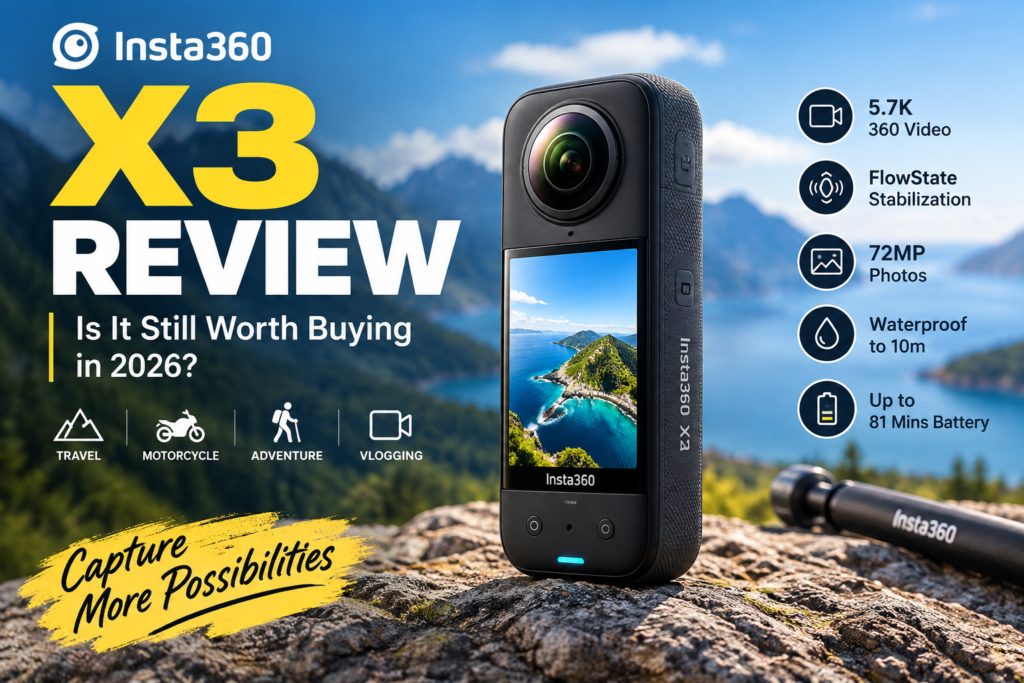
The Insta360 X3 was one of the cameras that helped make 360-degree video feel practical rather than experimental. Its dual-lens design lets you record everything around the camera first and decide where to point the shot later, while features such as FlowState stabilization, an invisible selfie stick effect, 72MP photos, and a large touchscreen made it much easier to use than earlier 360 cameras.
But there is an important question in 2026:
Is the Insta360 X3 still worth buying when newer cameras such as the Insta360 X4, X5, and X6 are now available?
For the right buyer, the answer is still yes — especially if you can buy the X3 at a substantial discount.
However, it is no longer the model we would recommend to everyone.
The X3 is best viewed today as a budget-friendly entry into 360-degree video, rather than a cutting-edge action camera.
In this Insta360 X3 review, we look at its video quality, stabilization, battery life, low-light performance, durability, editing experience, strengths, weaknesses, and how it compares with newer Insta360 cameras.
Quick Verdict: The Insta360 X3 remains a capable and fun 360 camera in 2026. Its 5.7K capture, excellent stabilization, reframing tools, and mature Insta360 editing ecosystem still make it useful for travel, motorcycles, cycling, skiing, social media, and casual creators. However, buyers who prioritize low-light performance, maximum image quality, higher frame rates, longer battery life, or future-proof hardware should consider a newer model.
Insta360 X3 Review: Our Rating
| Category | Rating |
|---|---|
| 360 Video Quality | 8/10 |
| Stabilization | 9/10 |
| Ease of Use | 8.5/10 |
| Editing Experience | 9/10 |
| Daylight Performance | 8/10 |
| Low-Light Performance | 6.5/10 |
| Battery Life | 7/10 |
| Durability | 7/10 |
| Value in 2026 | 8/10* |
| Overall | 8/10 |
*Value depends heavily on the price difference between the X3 and newer Insta360 cameras.
Insta360 X3 Pros and Cons
| Pros | Cons |
|---|---|
| Excellent FlowState stabilization | 5.7K is noticeably behind newer 8K models |
| Record first and reframe later | Reframed footage has limited resolution |
| Easy-to-use 2.29-inch touchscreen | Low-light quality is only average |
| Strong Insta360 editing ecosystem | Protruding lenses are vulnerable to damage |
| 72MP 360 photos | 4K Single-Lens mode is limited to 30fps |
| Invisible Selfie Stick effect | Battery life is modest by 2026 standards |
| Waterproof to 10m without a case | Newer X-series cameras offer much better hardware |
| Good option for first-time 360 buyers | Not ideal if you mainly need a conventional action camera |
How We Evaluated the Insta360 X3
This is a research-led editorial review, not a claim that SlashCouponCode performed a new laboratory test of an X3 specifically for this article.
We evaluated the camera using Insta360’s current technical documentation, feature specifications, product manuals, the position of the X3 within Insta360’s 2026 product lineup, and findings from established publications that conducted hands-on testing.
That distinction matters.
Google recommends that high-quality reviews demonstrate expertise, provide evidence, include quantitative comparisons, explain how products differ from competitors, and evaluate products from a user’s perspective.
Where we discuss subjective real-world behavior, we distinguish those observations from official manufacturer claims.
Insta360 X3 Specifications
The hardware may be several generations old now, but the X3 specifications remain respectable for casual 360 shooting.
| Specification | Insta360 X3 |
|---|---|
| Sensor | Dual 1/2-inch 48MP sensors |
| Aperture | f/1.9 |
| 360 Video | Up to 5.7K at 30fps |
| 4K 360 Video | Up to 60fps |
| 3K 360 Video | Up to 100fps |
| Single-Lens Video | Up to 4K30 |
| Maximum Photo Resolution | 72MP |
| Screen | 2.29-inch touchscreen |
| Weight | 180g |
| Battery | 1,800mAh |
| Claimed 5.7K30 Runtime | About 81 minutes |
| Waterproofing | IPX8, up to 10m/33ft |
| Storage | microSD |
| Stabilization | FlowState + 360 Horizon Lock |
Official Insta360 documentation confirms that the X3 uses 1/2-inch sensors with an f/1.9 aperture, weighs 180g, and has a 2.29-inch tempered-glass touchscreen.
The camera records 360 video at up to 5.7K30, 4K60, or 3K100. Single-Lens Mode reaches 4K30, while still images can reach 72MP.
Design and Build Quality
One reason the X3 became popular is its simple candy-bar design.
Instead of looking like a conventional GoPro-style action camera, the camera is tall and narrow, with one fisheye lens on either side.
The large 2.29-inch touchscreen was a major upgrade when the X3 launched. Even today, it makes changing modes, adjusting settings, and previewing footage significantly easier than using a tiny display.
At approximately 180g, the X3 is lightweight enough for a selfie stick, motorcycle mount, backpack mount, or handheld shooting.
There is one major design weakness, though.
The X3’s Biggest Ownership Risk: Its Lenses
A normal action camera usually has a relatively protected front lens.
A 360 camera cannot.
The X3’s fisheye lenses protrude from both sides of the body because they need to capture an extremely wide field of view. That means placing the camera carelessly on a rough surface or dropping it can potentially damage one of the most important components.
This is one area where later X-series cameras have evolved.
If you buy an X3 today, we strongly recommend using appropriate lens protection whenever your shooting situation allows it.
The trade-off is that any protective layer placed around a 360 lens can potentially introduce additional reflections, flare, or stitching artifacts in difficult lighting conditions.
So lens guards are useful — but keeping the actual glass clean and protected remains important.
Insta360 X3 360 Video Quality
The X3 records spherical video at up to 5.7K at 30fps.
That sounds extremely high compared with a standard 1080p or 4K video, but there is an important detail new 360-camera buyers often misunderstand.
5.7K is distributed across the entire 360-degree sphere.
When you later select only a conventional 16:9 portion of that sphere, you are using only part of the captured resolution.
That means reframed X3 footage does not look like native 5.7K or even native 4K footage from a traditional camera.
This is probably the single most important image-quality limitation to understand before buying an X3.
Digital Camera World reached a similar conclusion during its hands-on testing, noting that the X3’s 5.7K resolution becomes more limited once footage is reframed.
Still, resolution is not the only reason to use a 360 camera.
The main advantage is creative flexibility.
You can place the X3 on a selfie stick, motorcycle, bicycle, helmet, or tripod and capture almost everything happening around it.
Instead of worrying about framing while recording, you can decide the framing afterward.
That is what makes the X3 fundamentally different from a conventional action camera.
Reframing: The Feature That Makes the X3 Special
Traditional cameras force you to choose where the lens points before recording.
With a 360 camera, you can often make that decision afterward.
Imagine riding a motorcycle through a mountain road.
A conventional action camera may be pointed forward.
If something interesting happens behind you, you miss it.
The X3 records the environment around the camera, allowing you to later turn the viewpoint toward the road, yourself, another rider, the scenery, or different directions within the same recording.
That flexibility can also let one recording produce multiple clips for different platforms.
A horizontal YouTube clip, vertical Instagram Reel, and square social post can potentially come from the same 360 footage.
This workflow is one of the strongest reasons to choose a 360 camera.
FlowState Stabilization and 360 Horizon Lock
Stabilization is one of the strongest areas of the Insta360 ecosystem.
The X3 uses FlowState Stabilization together with 360 Horizon Lock.
Because the camera records a full spherical view, its software has significantly more information available to compensate for movement and rotation.
This is especially useful for:
motorcycling, cycling, running, skiing, hiking, travel videos, handheld walking shots, and selfie-stick footage.
Tom’s Guide mounted the X3 on a moving dog during testing and reported excellent stabilization performance. TechRadar also identified stabilization as one of the camera’s strengths.
In practical terms, stabilization remains one of the areas where the X3 still feels competitive even though its raw image-quality specifications are now dated.
Invisible Selfie Stick Effect
One of Insta360’s signature features is the Invisible Selfie Stick effect.
When a compatible selfie stick is positioned correctly within the camera’s stitching area, the software can effectively remove it from the final 360 footage.
The result often looks as though a floating camera or miniature drone is following you.
This is particularly effective for:
travel videos, skiing, hiking, motorcycle footage, cycling and walking shots.
It is one of the easiest ways to create shots that look very different from ordinary smartphone or action-camera footage.
The X3 still supports this core Insta360 experience despite being an older model.
Insta360 X3 Daylight Performance
Good lighting is where the X3 performs best.
In daylight, the dual sensors can produce detailed, colorful 360 footage that works especially well when you avoid excessively aggressive reframing or digital zoom.
For outdoor travel, motorcycle rides, city walks, beaches, cycling, skiing, or similar activities, image quality remains perfectly usable for social media and general content creation.
Insta360 itself recommends 5.7K30 as the normal daytime setting for the X3.
The camera is less convincing when you crop deeply into 360 footage.
Because a reframed view represents only part of the total 5.7K sphere, fine detail falls off faster than it does on newer 8K models.
For creators who routinely crop heavily, that difference matters.
Insta360 X3 Low-Light Performance
Low-light performance is where the X3’s age is much more obvious.
Its dual 1/2-inch sensors were an improvement over the X2, but camera technology has moved significantly since the X3 launched.
In bright daylight, the difference between generations can sometimes feel less important.
At night, inside dim buildings, or during evening rides, newer cameras with larger sensors and more advanced processing have a much clearer advantage.
Even Insta360’s own recommended shooting settings suggest changing strategy at night: the company recommends 4K30 for X3/X2 low-light scenes rather than the normal daytime 5.7K30 setup.
You can still record at night with an X3, but you should expect more noise, softer fine detail, and a greater chance of motion-related quality issues than with newer flagship models.
If low-light shooting is one of your primary use cases, the X3 would not be our first choice in 2026.
Active HDR
The X3 includes an Active HDR mode designed to retain more information in shadows and highlights while recording moving scenes.
It can be useful when there is strong contrast between bright skies and darker subjects.
However, this feature is not flawless.
Digital Camera World’s hands-on review found that Active HDR could sometimes produce a flatter or oversaturated appearance, with visible tonal changes in certain scenes.
Our recommendation is simple:
Use Active HDR when the scene genuinely needs additional dynamic-range help rather than leaving it enabled for every recording.
Single-Lens Mode: Can the X3 Replace a GoPro?
The X3 can use one lens at a time like a conventional action camera.
Single-Lens Mode supports up to 4K at 30fps, while 3.6K recording can reach 60fps.
This makes the X3 more versatile.
But it does not necessarily make it the best conventional action camera.
TechRadar’s hands-on review described the X3 as a capable all-rounder but noted that dedicated action cameras remain preferable if most of your recordings are traditional single-lens footage.
That conclusion makes even more sense in 2026.
If approximately 80–90% of what you want to shoot is normal forward-facing video, buy a modern dedicated action camera.
Choose the X3 because you actually want 360 capture and reframing.
Single-Lens Mode should be considered a bonus.
72MP 360 Photos
The X3 can shoot 360-degree photos at up to 72MP, along with a lower-resolution 18MP option.
High-resolution 360 stills can be useful for:
virtual tours, travel photography, reframed social photos, landscapes and interactive 360 experiences.
Again, the total megapixel count covers the entire spherical image.
A heavily cropped conventional image will contain significantly fewer usable pixels.
So do not compare a 72MP 360 image directly with a 72MP conventional photograph.
They serve different purposes.
Audio Quality and External Microphones
The X3 provides three audio modes:
Stereo, Wind Noise Reduction, and Direction Focus.
Direction Focus is particularly interesting because audio emphasis can change according to the direction selected while reframing 360 footage. Insta360 says Wind Noise Reduction is intended for outdoor activities such as cycling.
For casual use, the built-in microphones are convenient.
Creators who want more controlled voice recording can also connect supported external microphones.
Insta360 lists compatibility with several external microphone systems through its X3 Mic Adapter, including selected RØDE, BOYA, Sony and DJI microphone products.
For motovlogging or professional talking-head work, an external microphone is usually the better approach.
Insta360 X3 Battery Life
The X3 uses a 1,800mAh removable battery.
Insta360 rates it for approximately 81 minutes at 5.7K30 under specified laboratory conditions.
Real-world runtime will vary according to screen use, temperature, wireless connectivity, recording mode, and other settings.
Eighty-one minutes was respectable when the X3 launched.
In 2026, it looks considerably less impressive.
For comparison, Insta360 rates the X4 for approximately 135 minutes at 5.7K30 under its test conditions.
If you are planning a full day of travel, motorcycling, skiing, or outdoor shooting, carrying at least one spare X3 battery remains a sensible idea.
Waterproofing
The X3 carries an IPX8 rating and can be used underwater to a depth of 10 meters or 33 feet without a dive case, assuming its covers and seals are correctly closed and undamaged.
There is an important catch.
Water changes how light travels between the camera’s two lenses, which can interfere with 360 stitching.
Insta360 recommends using its dedicated dive case for proper underwater stitching. With the appropriate case, the X3 can be taken to approximately 50 meters/164 feet.
So while the camera itself is waterproof, serious underwater 360 shooting should still use the proper housing.
Insta360 App and Editing Experience
A 360 camera depends on software more than a traditional camera does.
Capturing the video is only the first half of the process.
After recording, you may need to:
change viewing angles, create keyframes, track a subject, change aspect ratio, export normal video, apply effects, trim clips or create automatic edits.
This is where Insta360 has historically been strong.
The app lets creators reframe footage and export different versions from a single recording. Tom’s Guide highlighted the range of editing tools and output aspect ratios available through Insta360’s software.
There is a learning curve.
Your first few 360 edits may take much longer than editing ordinary smartphone footage.
Once the workflow makes sense, however, the flexibility becomes one of the X3’s biggest advantages.
The question is no longer simply, “What did my camera point at?”
It becomes:
“What shot do I want to create from everything the camera captured?”
Is the Insta360 X3 Good for Motorcycles?
Yes — motorcycle shooting remains one of the strongest use cases for the X3.
A traditional action camera normally shows one angle.
The X3 can capture both the rider and the surrounding road and let you choose the camera movement during editing.
FlowState stabilization and Horizon Lock also help reduce unwanted motion.
Useful motorcycle perspectives include rear-mounted third-person shots, handlebar perspectives, selfie-stick views, front-facing road footage and rotating cinematic reframes.
However, motorcycle users should take lens protection seriously.
A stone, fall, careless mounting setup or impact can be considerably more expensive for a 360 camera than for a camera with a more protected replaceable front lens.
Is the Insta360 X3 Good for Vlogging?
It depends on the type of vlog.
For travel vlogging, the X3 can be excellent because you can walk through an environment without constantly deciding where to point the camera.
For conventional face-to-camera vlogging, however, a modern pocket gimbal camera or traditional action camera may provide better image quality for the same amount of storage and editing work.
The X3 makes the most sense when its 360 capability actually contributes something to the story.
Insta360 X3 vs X4 vs X5 vs X6
This is where the 2026 buying decision becomes interesting.
The X3 is no longer being compared only with its predecessor.
There are now several newer generations above it.
| Feature | X3 | X4 | X5 | X6 |
|---|---|---|---|---|
| Max 360 Video | 5.7K30 | 8K30 | 8K30 | 8K50 |
| 5.7K 360 | 30fps | 60fps | 60fps | — |
| Sensor | 1/2-inch | 1/2-inch | 1/1.28-inch | 1/1.1-inch square |
| Max 360 Photo | 72MP | 72MP | 72MP class | 120MP |
| Single/Flat Video | 4K30 | 4K60 | 4K60 | Up to 5K60 |
| Low-Light Focus | Basic | Improved generation | PureVideo + larger sensors | Current flagship processing |
| X3-era Battery Benchmark | 81 min at 5.7K30 | 135 min at 5.7K30 | Longer/newer platform | Up to about 140 min at 8K30 |
| Best For | Budget entry | Value 8K | Better low light | Maximum performance |
The jump from X3 to X4 was significant because X4 added 8K30 recording, 5.7K60, removable lens guards and much longer 5.7K30 battery life.
The X5 went further by introducing larger 1/1.28-inch sensors and a triple-chip processing system with PureVideo targeted at better low-light capture.
And in August 2026, Insta360 introduced the X6. Insta360 lists the X6 with up to 8K50 360 video, a 1/1.1-inch square sensor architecture, 120MP 360 photos, and significantly more advanced processing than the X3 generation.
So why would anyone still buy an X3?
Price.
Is the Insta360 X3 Still Worth Buying in 2026?
Yes — but only under the right conditions.
The X3 has moved from being a flagship purchase to being a value purchase.
If you are buying your first 360 camera and find the X3 significantly cheaper than an X4 or X5, it can still make a lot of sense.
You still receive the core experience that makes Insta360 cameras fun:
5.7K spherical capture, shoot-first/reframe-later workflow, FlowState stabilization, Horizon Lock, Invisible Selfie Stick, 72MP photos, waterproof construction and Insta360’s mature editing tools.
What you are giving up is primarily image quality and newer-generation hardware.
Buy the Insta360 X3 if:
You are new to 360 cameras, mainly shoot in daylight, want creative motorcycle/travel/action footage, publish primarily to social media, and can get the X3 substantially cheaper than newer models.
Skip the Insta360 X3 if:
You frequently shoot at night, want the cleanest possible reframed footage, need 8K capture, want 4K60 Single-Lens recording, regularly crop heavily into footage, or plan to keep the camera for several years and want the newest platform.
How Cheap Does the X3 Need to Be?
There is no universal answer because prices and promotions vary by country.
But we would use a simple buying rule:
Do not buy an X3 just because it costs slightly less than an X4.
The X4 gives you 8K360 video, 5.7K60, 4K100 in 360 mode, removable lens guards and significantly longer battery life.
If the price gap is small, buy the X4.
The X3 becomes compelling when the discount is large enough that you are effectively choosing between:
an affordable introduction to 360 video
versus
paying significantly more for higher-end image quality.
That is where the X3 can still win.
Insta360 X3 vs a Traditional Action Camera
This decision is actually more important than X3 versus X4.
Choose the X3 when you want:
360-degree recording, reframing after shooting, Invisible Selfie Stick perspectives, third-person-style shots and creative camera movements.
Choose a traditional action camera when you want:
maximum conventional video quality, straightforward editing, smaller file requirements, strong single-direction footage and minimal post-production.
The X3 is not simply another action camera.
Its biggest advantage is that it changes when you decide your framing.
Who Should Buy the Insta360 X3?
| User | Recommendation |
|---|---|
| First-time 360 buyer | Yes |
| Motorcycle creator | Yes |
| Travel creator | Yes |
| Cyclist / skier | Yes |
| Casual social creator | Yes |
| Professional low-light shooter | No |
| Buyer wanting best image quality | No |
| Traditional action-camera user | Probably not |
| Existing X4/X5 owner | No reason to downgrade |
| Budget buyer finding a major X3 discount | Strong option |
Insta360 X3 Frequently Asked Questions
Is the Insta360 X3 still good in 2026?
Yes. Its stabilization, 360 recording, reframing tools and editing ecosystem remain useful. However, its 5.7K maximum resolution and smaller sensors are noticeably behind newer X-series cameras.
Does the Insta360 X3 record 8K video?
The X3 can create 8K timelapse content, but normal 360 video recording tops out at 5.7K30. If normal 8K 360 video is important to you, look at newer models such as the X4, X5 or X6.
Is Insta360 X3 4K?
Yes. In Single-Lens Mode, the X3 records up to 4K30. In 360 mode, it can record 4K at up to 60fps.
How long does the Insta360 X3 battery last?
Insta360 rates the X3 for approximately 81 minutes when recording 5.7K30 under specified laboratory conditions. Actual runtime depends on settings and environmental conditions.
Is the Insta360 X3 waterproof?
Yes. It is IPX8 rated and waterproof to 10 meters/33 feet without a case when properly sealed. Insta360 recommends a dedicated dive case for reliable underwater 360 stitching.