MusicAPI.ai Coupon Code and Discount Offers
Looking for a MusicAPI.ai coupon code to save on an AI music generation API subscription? This page brings together available promo codes, official pricing benefits, free signup credits, and practical steps for applying a discount at checkout.
MusicAPI.ai provides an API that developers can use to integrate AI-generated music, songs, vocals, and instrumentals into their applications. Before purchasing a subscription, compare the available plans, review the terms of each offer, and confirm the final price at checkout.
Available MusicAPI.ai Coupon Codes
If you're searching for a MusicAPI discount code, start with the offers listed on this page. Check each code's eligibility and confirm that the discount appears in your order summary before completing payment.
SLASH10 — 10% Off Your First Payment
Use the code SLASH10 for the advertised 10% discount on your first payment, subject to the offer's applicable terms.
-
Discount: 10% off the first payment
-
Coupon code: SLASH10
-
Eligibility: First payment, as specified for this offer
-
Before paying: Confirm that the code is accepted and the discount appears in the checkout summary.
SHRIKANT — 10% Off Your First Payment
The code SHRIKANT is another listed offer for 10% off the first payment, subject to applicable terms.
-
Discount: 10% off the first payment
-
Coupon code: SHRIKANT
-
Eligibility: First payment, as specified for this offer
-
Before paying: Review the final price and any conditions displayed at checkout.
Important: Coupon availability and eligibility may change. A code should be considered successfully applied only when the official checkout confirms the discount. Do not assume that both codes can be combined.
Official MusicAPI.ai Benefits
A coupon code is not the only way to evaluate the cost of MusicAPI.ai. The official website also advertises benefits for new users and annual subscribers.
75 Free Signup Credits
MusicAPI.ai advertises 75 free credits for new accounts, with no credit card required to get started. These credits can help developers evaluate the API before committing to a paid subscription.
The number of generations available depends on the model and operation selected, so check the official credits guide before estimating your usage.
Annual Subscription Savings
MusicAPI.ai advertises approximately two months free with annual billing compared with paying month by month. Compare the annual total with the monthly option before choosing a billing period.
Annual billing is a pricing benefit, not the same as a promo code. Confirm the current plan price and billing terms on the official pricing page.
Compare Subscription Plans
Visit the official MusicAPI.ai pricing page to compare available plans, billing options, included credits, and features.
For a clearer understanding of credit consumption, see the MusicAPI credits usage guide.
What Is MusicAPI.ai?
MusicAPI.ai is an AI music generation API designed for developers who want to add music-generation capabilities to software, applications, and other digital products.
Depending on the available model and endpoint, the API supports workflows involving song generation, vocals, instrumentals, and other music-related operations.
Who Can Use MusicAPI.ai?
MusicAPI.ai may be useful for:
-
Developers building applications that generate music.
-
Startups integrating AI audio features into their products.
-
Teams experimenting with automated music-generation workflows.
-
Businesses evaluating API-based music generation for their software.
Because the service is API-focused, users should review the documentation and technical requirements before subscribing.
How to Use a MusicAPI.ai Coupon Code
Follow these steps to try a MusicAPI.ai promo code and check whether the advertised discount applies to your purchase.
Step 1: Open the Official MusicAPI.ai Website
Visit MusicAPI.ai and sign in to your account or create an account if you are new.
New accounts may qualify for the free signup credits advertised by MusicAPI.ai. Review the current terms before proceeding.
Step 2: Choose a Suitable Subscription
Open the official pricing page and compare the available plans.
Choose a plan and billing frequency that fit your expected usage. Check the billing amount, included credits, and any relevant subscription conditions before continuing.
Step 3: Enter Your Coupon Code at Checkout
Proceed to the official checkout and look for the coupon, promo code, or discount-code field, if one is provided.
Enter SLASH10 and apply it. If the code is not eligible, review the displayed message. You can also try SHRIKANT separately if the first code does not work.
Do not assume that a code has been applied merely because you entered it.
Step 4: Check the Discount in the Order Summary
After applying the code, inspect the checkout summary carefully. Confirm whether the discount is displayed, the amount deducted, the final amount due, and whether the offer applies to the intended payment.
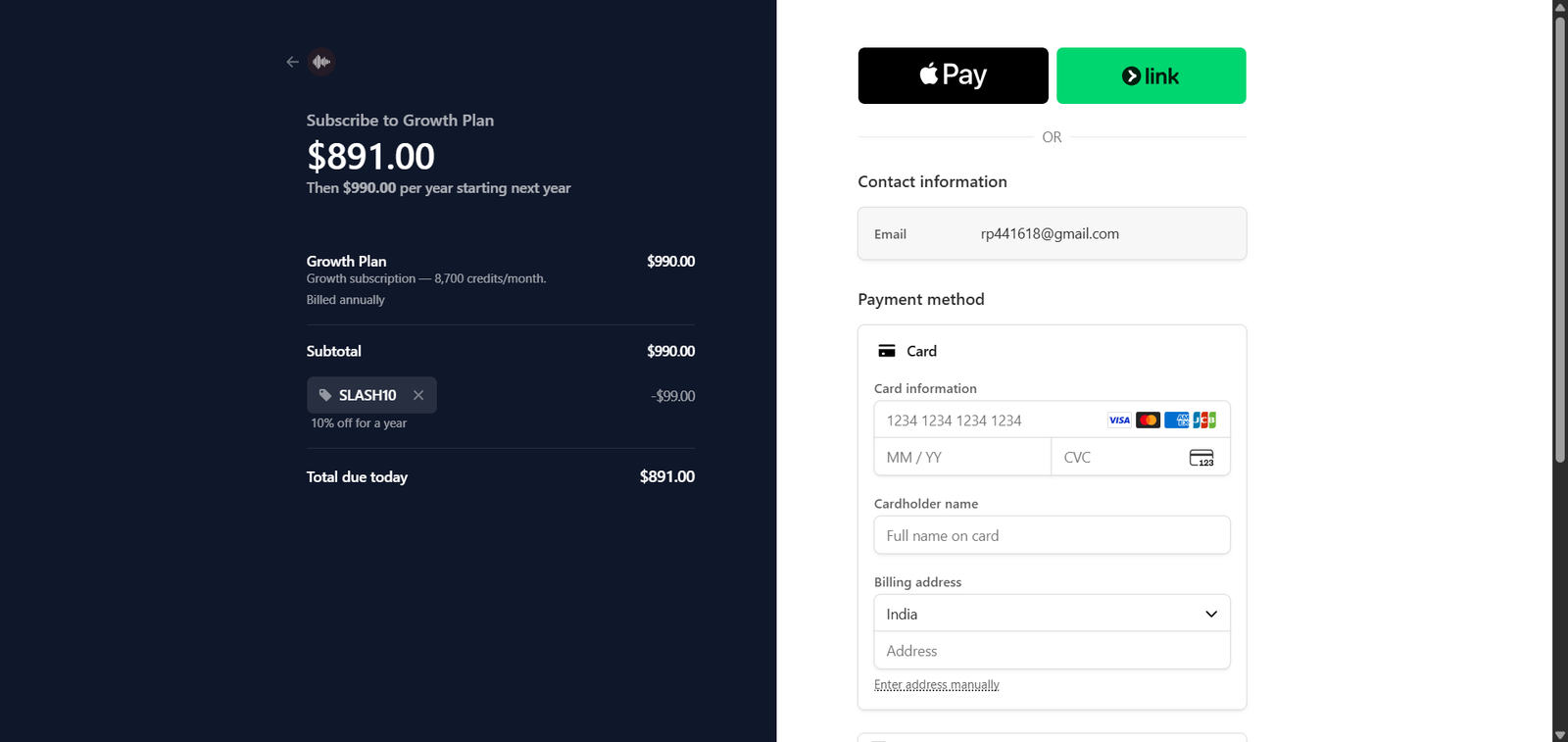
Step 5: Confirm the Final Price Before Paying
Complete the purchase only after reviewing the final price and applicable terms. If the discount does not appear, do not assume that it will be added after payment.
Never share API keys, passwords, payment-card details, billing addresses, or other sensitive account information in a public screenshot.
Why Is My MusicAPI.ai Coupon Code Not Working?
If a MusicAPI.ai coupon code fails, check the following possibilities:
-
Eligibility: The offer may apply only to a first payment or a particular plan.
-
Typing errors: Check for extra spaces or incorrect characters.
-
Billing frequency: The code may have restrictions related to monthly or annual billing.
-
Previous use: The offer may not be available to accounts that have already used it.
-
Expired or changed offer: The terms may have changed since the code was listed.
-
Checkout confirmation: Check the message displayed by the official checkout instead of assuming the code worked.
If neither code applies, review the official pricing page and contact MusicAPI.ai support if you need clarification about eligibility.
MusicAPI.ai Pricing and Credits: What to Check
Before selecting a subscription, consider more than the advertised discount percentage.
-
Monthly versus annual billing: Compare the total cost over the same period.
-
Included credits: Check how many credits the selected plan provides.
-
Credit usage: Different API operations may consume different amounts of credits.
-
Unused credits: Review the official rules for subscription credits and additional credit packs.
-
Cancellation and renewal: Understand the billing and cancellation terms before paying.
For current details, consult the official pricing page and credits usage guide, as plan details and credit costs can change.
Frequently Asked Questions
Is there a MusicAPI.ai coupon code?
This page lists SLASH10 and SHRIKANT as offers for 10% off the first payment. Availability and eligibility should be confirmed at the official checkout.
How much can I save with the SLASH10 code?
The advertised offer is 10% off the first payment, subject to its applicable terms. Confirm the actual discount and final price at checkout before paying.
Can I use SHRIKANT instead of SLASH10?
You can try SHRIKANT separately if SLASH10 is not accepted. The checkout must confirm whether the alternative code is eligible.
Does MusicAPI.ai offer free credits?
Yes. MusicAPI.ai advertises 75 free signup credits for new accounts, with no credit card required to get started. Check the official website for the current terms.
Does MusicAPI.ai offer a discount on annual plans?
The official pricing page advertises approximately two months free with annual billing. Compare the current annual total with the equivalent monthly cost before choosing a plan.
Where can I check MusicAPI.ai's official prices?
What should I do if my MusicAPI.ai coupon code fails?
Check the code spelling, plan eligibility, billing frequency, and checkout message. If the discount does not appear in the order summary, do not assume it has been applied.
Final Check Before You Subscribe
Before completing your purchase, compare the available subscription plans, review the coupon's conditions, and verify the final price shown by MusicAPI.ai. A successful discount should be visible in the official checkout summary before payment.
Explore the official MusicAPI.ai website and pricing page for the latest service and billing information.